
Common Checkout Mistakes that Could Be Costing UK Store Owners Sales
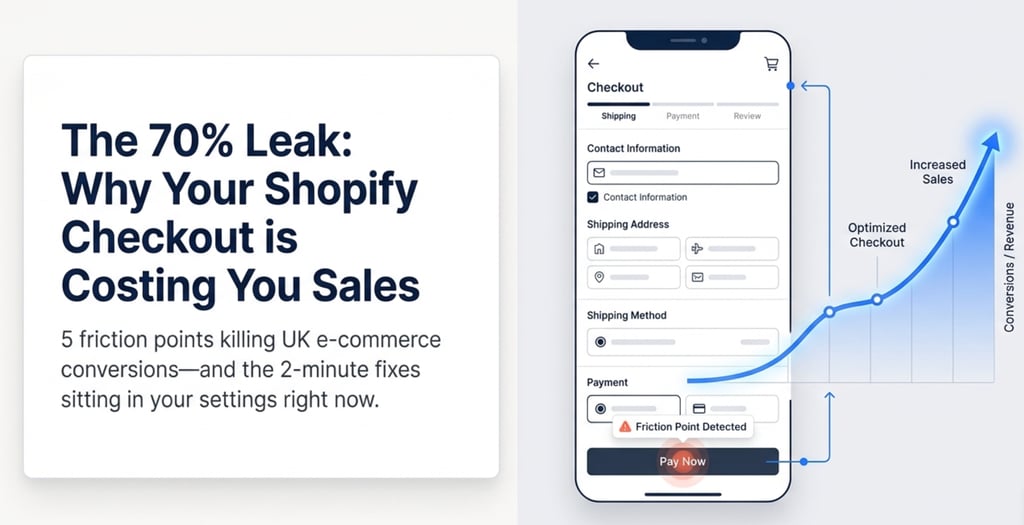
If your Shopify checkout is losing sales, the culprit is almost always one of three things: unexpected shipping costs appearing at the final step, a forced account creation, or a checkout that does not work properly on mobile. Together these three issues account for roughly 70% of abandoned checkouts on UK Shopify stores. None of them require a developer to fix. This post covers the most common checkout problems I see when auditing small UK stores, the exact settings to change, and what to do about customers who leave before completing their order. By the end, you'll have a clear action list you can work through today.
5/22/20267 min read
Is Your Shopify Checkout Losing You Sales Every Day?
If you've ever looked at your Shopify analytics and wondered why people are adding things to their basket but not buying, the checkout is usually where the sale dies. Cart abandonment across ecommerce sits at around 70%, and for small UK stores the number is often higher. The frustrating part is that most of the causes have nothing to do with your product or your price. They are fixable issues sitting in your Shopify settings right now. This post covers the six most common checkout problems I see on UK Shopify stores, and exactly what to change in each case.
Why Most Shopify Checkouts Leak Sales (And It Is Not What You Think)
The research is consistent on this. Roughly half of abandoned checkouts come down to unexpected extra costs, usually shipping, that only appear at the final step. Another quarter are caused by stores forcing customers to create an account before they can buy. Around 22% blame a checkout that feels too complicated or takes too long.
None of those are about your product. They are about friction. And friction at checkout, the point where someone has already decided they want to buy, is the most expensive kind there is.
In my experience working with UK Shopify store owners, the most common issue I find on a first audit is that shipping costs are not visible until step three of checkout. By that point the customer has already typed in their name, email, and address. When a surprise £6.99 shipping charge appears, they leave. Most do not come back.
The good news is that every one of these problems is solvable inside your Shopify admin. No developer, no custom code, no expensive app needed.
How to Enable Guest Checkout and Stop Turning Away Buyers
Forcing customers to register before they can buy is the second biggest reason people abandon Shopify checkouts. For a first-time buyer, being asked to create an account before completing a purchase feels like friction before value. They have not bought from you yet. They have no reason to commit their details beyond what is needed to place the order.
The fix takes about two minutes. In your Shopify Admin, go to Settings > Checkout > Customer accounts and change the setting to "Accounts are optional" or "Accounts are disabled." Save the page.
This one change regularly moves checkout conversion by several percentage points on stores I have worked on. The customer still provides their email address during checkout, so you are not losing anything in terms of follow-up capability. You still get the email for order confirmation and, if they opt in, for marketing.
If you are on a theme that shows a login prompt before checkout, go to Online Store > Themes > Customise and look for customer account or login options. Switch them off.
Are Hidden Shipping Costs Killing the Sale Before It Starts?
Unexpected shipping costs at the final step are the single biggest reason UK shoppers abandon checkout. If a customer sees a product price on your store, adds it to their basket, and then only discovers a £5.99 shipping charge right before they pay, most of them will leave.
There are two practical fixes. The first is to make your shipping costs visible before checkout begins. Add a line to your product page and cart page saying something like "Free UK delivery on orders over £40" or "Shipping from £3.99." Most Shopify themes have a text block or announcement bar you can edit directly in the theme editor without touching any code.
The second is to review whether your shipping rates are competitive. Go to Settings > Shipping and delivery in your Shopify Admin and check what you are currently charging. Many stores find that introducing a free shipping threshold at a modest order value, say £35 or £40, actually increases average order value while reducing abandonment at the same time.
What I most commonly find when first looking at a new store is that the founder set up shipping rates on day one and never revisited them. Rates are often on defaults that do not reflect real carrier costs, and there is no free shipping option even when adding one would pay for itself within weeks.
How to Turn On Abandoned Checkout Emails in Under 10 Minutes
Even with a well-set-up checkout, some people will still leave. Life interrupts. They get distracted, their phone dies, they meant to finish later and forgot. Abandoned checkout emails exist to catch these people before they move on entirely.
Shopify has this feature built in and it takes less than 10 minutes to activate. Go to Settings > Checkout > Abandoned checkouts. Tick the box to automatically send abandoned checkout emails. Customise the subject line to include your business name. Save
That is it. You do not need Klaviyo or any paid tool to get started. Shopify's built-in email sends automatically to anyone who started a checkout and left their email address. Most stores using this basic setup recover 3 to 8% of abandoned checkouts, which for a store doing reasonable volume can add up to meaningful monthly revenue for zero ongoing cost.
One important note for UK stores: make sure your email marketing consent setup is correct for GDPR. Go to Settings > Checkout > Email marketing and check how you are collecting consent. Abandoned checkout recovery emails are transactional in nature, but it is worth checking that your setup is clean before you switch this on.
What Trust Signals Does Your Checkout Need to Convert First-Time Buyers?
A visitor who has never bought from you before has no reason to trust that their card details are safe, that the product will arrive, or that someone will respond if something goes wrong. Trust signals exist to answer those unspoken questions before they become reasons to abandon.
The basics are: an SSL certificate, which Shopify handles automatically so you just need to confirm the padlock shows in the browser; a returns policy that is easy to find; and at least a handful of genuine customer reviews somewhere visible on your product or cart page.
Beyond the basics, you can add trust badges to your cart page using your theme's content editor. Most Shopify themes have a section for icons or image blocks near the cart. A simple set of icons covering "Secure checkout," "Free returns," and "UK delivery" can improve conversion meaningfully, particularly on stores selling to customers who have not heard of you before.
Do not underestimate how much a visible email address helps. It signals that a real person is behind the store and that there is someone to contact if something goes wrong. This is one of the simplest things you can add and one of the most often overlooked.
Is Your Checkout Breaking on Mobile Without You Knowing?
More than half of UK ecommerce traffic now comes from mobile. If your checkout looks odd or behaves poorly on a phone, you are losing sales from the majority of your visitors, potentially without realising it.
The quickest way to check is to go through your own checkout on your phone right now. Add a product to the basket, go through to checkout, and pay attention to how the experience feels. Are the buttons easy to tap? Does the keyboard push the form fields off screen? Does anything feel cramped or unclear?
A few specific things to look for: check whether Shop Pay is enabled on your store. Shop Pay lets mobile customers complete checkout in two taps using saved payment details, and it removes most of the friction that makes mobile checkout slow. Go to Settings > Payments in your Shopify Admin and make sure Shop Pay is switched on.
If something looks broken on mobile and you cannot trace it to a setting, it is often caused by a third-party app that is injecting elements into your cart or checkout. Temporarily disabling recently installed apps one at a time is the most reliable way to identify the cause.
Frequently Asked Questions
Why is my Shopify checkout abandonment rate so high?
The most common reasons are unexpected shipping costs appearing at the final step, customers being asked to create an account before buying, and a checkout that does not work well on mobile. These three issues account for roughly 70% of abandoned checkouts. All three are fixable in your Shopify settings without any developer involvement.
How do I enable guest checkout on Shopify?
Go to Shopify Admin > Settings > Checkout > Customer accounts and change the setting to "Accounts are optional" or "Accounts are disabled." This allows buyers to complete a purchase without registering first, which significantly reduces friction for first-time customers and typically improves checkout conversion rate.
Do I need a developer to fix my Shopify checkout?
In most cases, no. The most impactful fixes, including guest checkout, abandoned email recovery, shipping rate visibility, and Shop Pay, are all inside your Shopify admin settings. Trust badges and shipping notices can usually be added in the theme editor without touching any code.
How do I recover abandoned checkouts on Shopify?
Go to Settings > Checkout > Abandoned checkouts in your Shopify Admin and enable automatic recovery emails. Shopify will send an email to anyone who started checkout and provided their email address. This is free, built into Shopify, and takes around 10 minutes to set up. Most stores see 3 to 8% of abandoned checkouts recovered with just this basic setup.
What is a normal cart abandonment rate for a UK Shopify store
The average ecommerce cart abandonment rate is around 70%. For checkout specifically, meaning people who have already started the checkout process, abandonment rates of 45 to 55% are typical. If yours is significantly higher than that, the fixes covered in this post are the right starting point.
Getting Your Checkout Actually Converting
The most important thing to take from this is that checkout problems are almost never about your product. They are about friction, surprise costs, and a lack of trust signals at the moment someone is deciding whether to hand over their money. Fix the friction, show the costs early, and make sure a real person is visible behind the store.
If you have worked through this list and your checkout still is not converting the way it should, the problem is likely something specific in your setup that is easier to spot with fresh eyes. eCommerce Assist works with UK Shopify store owners to audit and fix exactly these kinds of issues.
Get in touch at ecommerce-assist.co.uk and tell Peter what is going on. A short look at a store often surfaces things that have been quietly costing money for months.
Subscribe to our newsletter
E-commerce Assist
Ecommerce Assist provides ecommerce virtual assistant support for UK founders, handling day-to-day eCommerce tasks and SEO so businesses move forward without the stress of doing everything alone.